
Start with one budget
Pick the period that matches how you spend: weekly, fortnightly, or monthly.
New mobile budgeting app
A cleaner way to plan a personal budget, enter expenses by hand, and see what is left before the period ends.
Why AI Fund
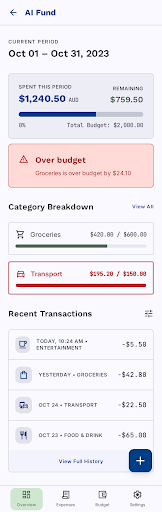
AI Fund is for people who want a simple spending rhythm: set a budget, record expenses, check categories, and adjust before the month gets away from them.
Pick the period that matches how you spend: weekly, fortnightly, or monthly.
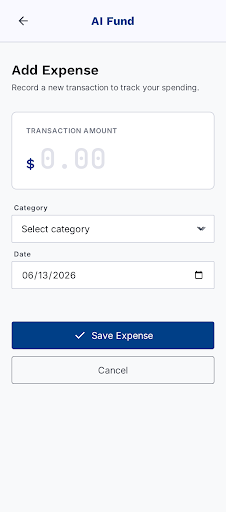
Add amount, date, and category from a clean mobile expense form.
Track remaining budget and category progress before the period ends.
Export transactions to CSV when you want your records outside the app.
How it works
Use Apple, Google, or demo mode to see how the app feels with sample spending.
Choose AUD or USD, budget frequency, period start rule, and a total limit.
Enter each purchase with just the amount, date, and category.
Review spending, tune category limits, and export transactions when needed.
Built for clarity
AI Fund keeps the experience focused on the decisions users make every day: how much was spent, which category it belongs to, and how much budget remains.